What is LF Hub
What is LF Hub?
In the dev branch
LF Hub is available when you build the dev branch of LoopFollow. It will come to main in a later release. Browser builders need one more identifier first, see Update for LF Hub.
LF Hub is a service that runs online around the clock, much like a Nightscout site. It watches one person's glucose data for the whole family. It reads the same Nightscout site or Dexcom Share account that LoopFollow reads, and it sends to each family member's iPhone:
- the alarms
- the number on the app icon (the badge)
- the Live Activity on the lock screen
- Speak BG
It sends them as Apple push notifications, so LoopFollow does not have to stay running on the phone.
One hub serves one family and one person. Every phone that follows that person can join the same hub.
Not medical advice
LoopFollow and LF Hub are open-source software that people build and run themselves. They are not medical devices and do not give dosing advice. Alarms depend on the hub, the internet, Apple's push service and the phone, and any of them can fail. Do not rely on LF Hub as the only way an alarm reaches you. Talk to your care team about how you use alarms.
Why does LF Hub exist?
Without a hub, every phone that follows someone has to keep LoopFollow running in the background, day and night. iOS does not like that. LoopFollow uses tricks such as playing silent audio (Background Refresh) to stay awake, and they cost battery. When iOS stops the app anyway, the phone gets no alarms until someone opens LoopFollow again, and you see the "App inactive" warnings described in the FAQs.
With LF Hub, a server that is always on does the watching. The phones only receive what the hub sends. LoopFollow can be closed, the phone can be locked, and the alarms still arrive and ring through silent mode.
What you need
- LoopFollow with LF Hub (the
devbranch for now) on every phone - iOS 26 or newer on every phone. LF Hub alarms are iOS system alarms (AlarmKit), which need iOS 26.
- A hub, either hosted for you or one you run yourself, see Get a Hub
- An APN key in LoopFollow under Settings → APN on the phone that sets up the hub. This is the same key that the Live Activity and remote commands use.
- Every phone in the family runs LoopFollow built with the same Apple Developer account as the admin's phone. Those phones use the admin's key and need no key of their own.
- A phone that joins with an invite never sends its own APN key to the hub. If its LoopFollow was built with a different Apple Developer account, the admin's key cannot reach it, so it gets no notifications from the hub and LoopFollow keeps checking the alarms itself. To use LF Hub on that phone, install LoopFollow from the same build as the admin.
Admins and members
Each phone that joins a hub has a role:
- An admin sets the data source (Nightscout and/or Dexcom Share), invites family members and manages the list of phones. The first phone, connected with Set Up as Owner, is an admin. An admin can make another phone an admin too. The hub always keeps at least one admin.
- A member follows with its own alarms. The hub gives the member the data source, so a member never types in a Nightscout address or a Dexcom password. A member cannot change the data source, invite or manage phones.
What happens when something goes wrong
LF Hub adds a server that has to keep working. LoopFollow watches for that:
- Every phone keeps its own copy of the data source. When LF Hub is not sending this phone's alarms, LoopFollow checks the alarms itself, and an orange banner on the Home screen says so.
- The phone checks that the hub still answers when iOS gives it a moment in the background, when you open LoopFollow, and while it is open. After 5 minutes without an answer, LoopFollow starts checking the alarms itself again. After 20 minutes it raises one alert that the hub has stopped.
- A monitoring service for the hub (see Get a Hub) tells the person who runs it right away when the hub stops.
If the hub stops while the phone is locked
The phone only notices a problem when LoopFollow gets to run, and while the phone is locked iOS decides when that is. It can be a long time. If the hub, its internet connection or Apple's push service stops while the phone is locked, no alarms may reach the phone until iOS lets LoopFollow run again, neither from the hub nor from LoopFollow. Opening LoopFollow checks the hub right away. See How LF Hub Works.
When Background Refresh uses LF Hub, the Home screen shows a small server icon before the source name: blue while the hub answers and reaches this phone, red while it does not.
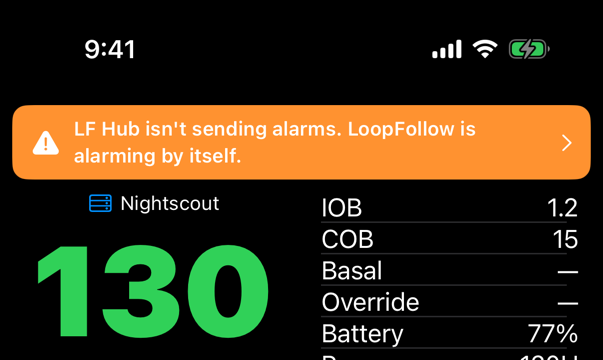
The orange banner in this example appears because this phone cannot get push notifications yet. Tap it to see what is missing.
Next steps
- Get a Hub: hosted for you, or run it yourself
- Set Up and Invite: connect the first phone and add the family
- How LF Hub Works: the Ready list, what happens when something stops working, and what changes in Hub mode